ArgumentParser() 参数详解
# 创建参数解析器
parser = argparse.ArgumentParser(description='程序描述')
比较有用的一些参数:
description: A description of what the program does (程序的描述信息,显示在帮助文档开头)
usage: A usage message (default: auto-generated from arguments)(不建议修改)
formatter_class: HelpFormatter class for printing help messages
	# RawDescriptionHelpFormatter 保留 description 和 epilog 的原始换行格式。
	# RawTextHelpFormatter help.同上
	# ArgumentDefaultsHelpFormatter 在帮助信息中自动显示参数的默认值。
	# MetavarTypeHelpFormatter 用参数的类型名(如 int、str)替代大写的参数名作为 metavar
	# 也可以自定义格式
	# 组合使用:
	# class CustomFormatter(
	#     ArgumentDefaultsHelpFormatter,
	#     RawDescriptionHelpFormatter
	# ):
	#     pass
	# 然后 formatter_class=CustomFormatter
epilog: Text following the argument descriptions(显示在帮助信息的最后)
	# epilog="示例用法:\n  python demo.py --input data.txt --output result.txt"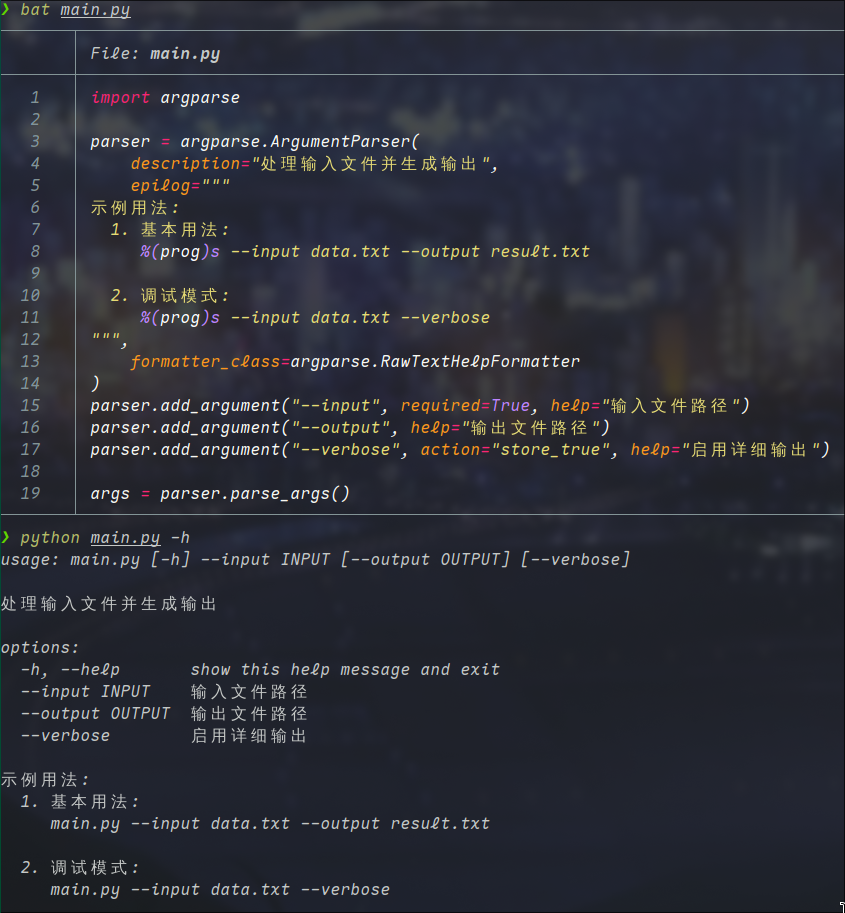
add_argument() 参数详解
用于添加命令行参数,主要分为:
- 位置参数(必选参数,如
input_file) - 可选参数(以
-或--开头的参数,如--output)
基本参数
| 参数 | 说明 | 示例 |
|---|---|---|
name/flags | 参数名(--output)或位置参数名(input_file) | "--output" 或 "input_file" |
action | 参数的动作(如存储值、布尔开关等) | action="store_true" |
nargs | 参数的个数 | nargs="+"(1个或多个) |
const | action 或 nargs 需要的常量值 | const=42 |
default | 默认值 | default="output.txt" |
type | 参数类型(如 int, float, str) | type=int |
choices | 允许的参数值列表 | choices=["a", "b", "c"] |
required | 是否必须(对可选参数) | required=True |
help | 参数的帮助信息 | help="Output file path" |
metavar | 在帮助信息中显示的参数名称 | metavar="FILE" |
dest | 解析后存储的属性名 | dest="output_file" |